They install nothing
Only you install Parley. Guests need no Parley account, app, or licence — they just join the meeting as usual.

AI-native voice translation
Speak your language. Hear theirs in yours. Parley brings two-way translated voice and bilingual captions to the meeting apps you already use.
Live voice cloning — Qwen and Doubao keep your voice in the meeting, with no advance recording.
Windows 11+ & macOS 14.5+ · No subscription
很高兴,能和你聊聊。
It’s good to talk with you.
Illustrative conversation
For the meeting apps
you already use.
Via audio-device setup.
Not a partnership endorsement.
TWO WAYS. ONE CONVERSATION.
Understand what they mean.
Say what you want to say.
Parley turns your speech into their language and sends it to your meeting app. Your conversation partner stays exactly where they are.
Visual example only. No live audio or measured latency.
 parleyConversation preview
我们周五见,一起讨论下一步。
Original speech
Let’s meet on Friday to discuss the next steps.
THE PARLEY DESKTOP APP
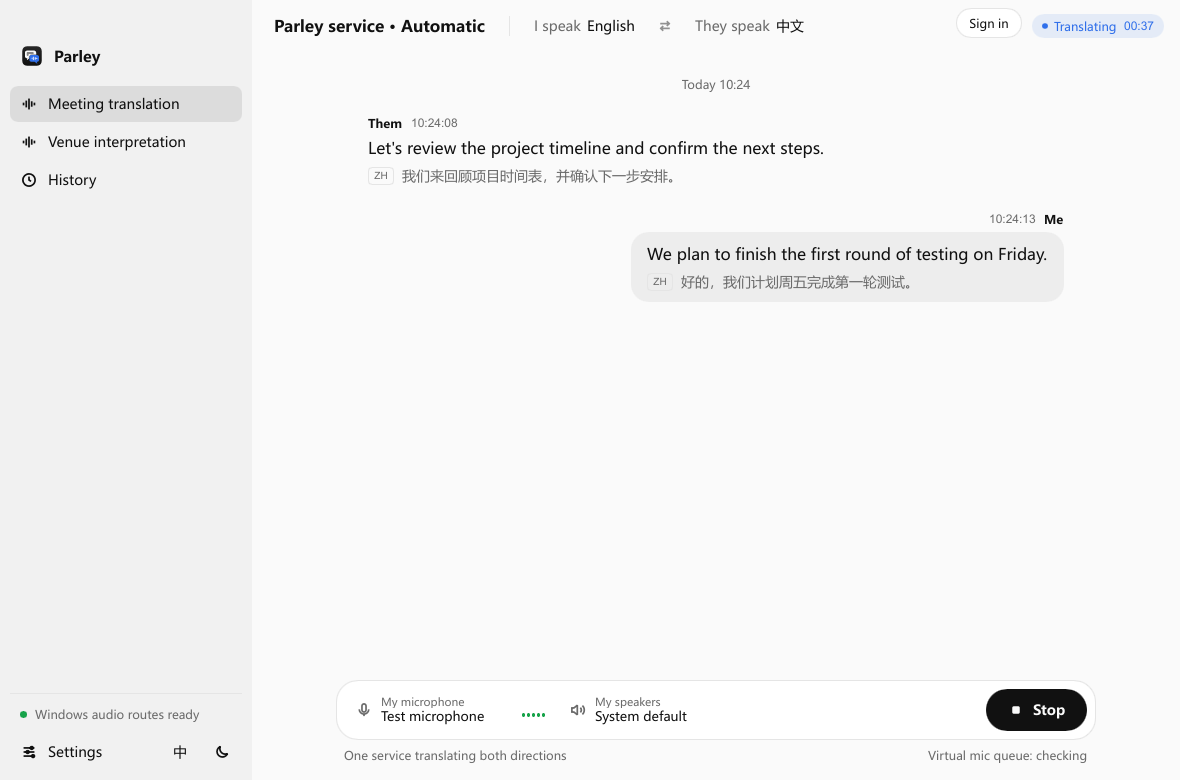
Actual app interface · Sample conversationClick the image to view full size ↗
Only you install Parley. Guests need no Parley account, app, or licence — they just join the meeting as usual.
Use the headphones you already own. No translation earbuds or dedicated hardware — and no device swap. Virtual audio routing is enough for online meetings.
Original and translation on screen. Caption history stays local and exports as SRT.
Live voice cloning with Qwen and Doubao — no advance recording or enrollment. They hear translation in your voice.
Hear how meeting translation in your own voice works
FAMILIAR TOOLS. NEW POSSIBILITIES.
The client call. The overseas team. The next big idea. Keep the software and headphones you know, and let Parley help with the language.
Find your setupWHERE CONVERSATIONS HAPPEN
Live two-way voice translation and bilingual captions for client calls and team meetings. Only you install Parley—guests stay in Zoom, Meet, or Teams with zero install on their side.
Online meeting translationTranslate a speaker into one or several languages, each on its own output device. A venue licence unlocks this mode; usage is billed separately.
In-person interpretationLive voice, captions or venue interpretation? Compare the three modes
LANGUAGES & VOICES
Switch any time in the app. Both managed models include live voice cloning at the displayed session rate — no personal API key needed.
Powered by state-of-the-art large language models, keeping pace with the latest advances.
Check language coverage60 input languages · 29 spoken output languages. Configure speaking and listening independently in the app; Cantonese is input-only.
$0.070 / minute
Built for business meetings and interviews in Chinese and English.
$0.148 / minute
Both managed models include live voice cloning — no advance recording required.
Qwen reports LAAL of about 2.3 seconds; Doubao reports speech output latency of about 2.53 seconds. These are different metrics, not a direct speed comparison or a guarantee of app latency. Actual delay depends on the model, network and audio devices.
Provider demonstrations are not Parley app recordings.
BEFORE YOUR FIRST CALL
Select a model and a language pair supported by your installed app.
Connect your microphone, meeting audio and headphones using the setup guide.
Run a short check before your call. Stop the session during breaks.
PAY AS YOU GO
No recurring subscription. Both directions share one connected-session charge. See what your next meeting could cost.
Parley is live simultaneous interpretation software for Windows and Mac. Qwen and Doubao are available now. A $1 first top-up is enough to try.
Explore pricingOne session charge for both directions. Connected time includes silence. Stop the session to stop billing.
Current list rates · before offers. Current pricing ↗
AFTER THE CONVERSATION
Caption history is stored locally and exports to SRT any time. Selected captured audio is sent to the cloud service for translation — records that matter stay on your machine.
How audio and account data are handledIt turns speech into translated speech while the meeting runs. Parley translates your microphone into the other person's language and sends it through your meeting app's microphone setting, and translates their meeting audio into your language in your headphones, with bilingual captions.
No. Only the person running Parley installs it. Others hear your translated voice as ordinary meeting audio and need no account, app or licence.
Captions give people text to read. Voice translation lets them listen and reply naturally. Parley does both: translated speech in each direction, plus original and translated captions on your screen.
Qwen and Doubao currently support live voice cloning, so you do not need to record a voice sample or create a clone in advance.
Your microphone goes to the meeting in their language; their meeting audio plays to you in yours. Venue mode turns one input into one or several languages, each on its own speaker. Both include bilingual captions.
No. Your existing audio gear and a Windows or Mac computer are enough. Sending translated speech into a meeting needs virtual audio routing. Managed translation has no recurring subscription.
Choose one of four desktop versions. Review the requirements and setup guide, then check your microphone, headphones and meeting audio before purchasing.
One hour is billed as one 60-minute session at the selected model's per-minute rate. Two directions or several outputs do not double it, and silence while connected counts. See the fixed-cost table for current figures.
Billing counts actual milliseconds once the service connection is ready, silence included. Short sessions aren't rounded up to whole minutes. Two directions cost one session charge. See current pricing.
No. The personal API licence connects your own provider account, which bills usage separately. A licence never adds wallet credit. See the personal API guide.
Not all of it. Selected captured audio is processed by the cloud service; caption history is stored locally. Read the audio and data handling overview.
Choose Windows x64 or ARM64, or Mac for Apple Silicon or Intel.
Prefer the setup walkthrough? Downloads are also on Get started.
Download Parley